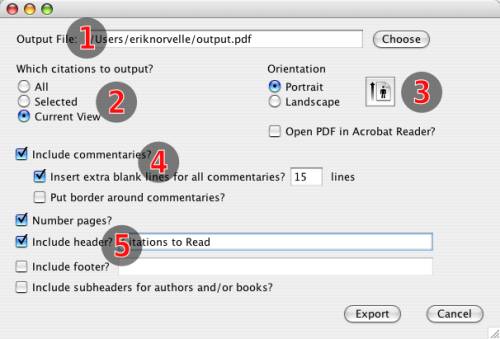
The PDF export dialog
TextCite can export your citations in PDF format, so that it is easy to send them to a printer or email them, etc.
The PDF export dialog
You must indicate the name of the file to which you want the exported citations to go.
Which are the citations that should be included? All of them, the ones that are currently selected in the table, or all visible citations in the table.
Export in "landscape" or "portrait" mode: this controls the orientation of the text on the exported pages.
If you want to include your commentaries, or leave blank space next to each text for writing in commentaries, by choosing this option the output will be divided into two columns, and the right-hand column will include your commentaries, or else mandatory whitespace (with a fixed number of lines that you indicate here).
This group of options control headers and footers. You can introduce custom text that will appear as a header or footer. The final option indicates whether you want the citations to be organized by author and publication; if you activate this option, every time a new publication or author is started, a subheader will be generated to indicate the name or title.