exportacion_rtf.png
TextCite has the ability to export citations in RTF format. RTF is a kind of file that can be opened and edited in Microsoft Word and OpenOffice, among other programs. Therefore, it is an ideal format for exporting large groups of citations for use in an article, or for distributing citations to other persons.
A writing aid
If you have your citations well-organized with categories, and you have commented the citations that you wish to export, the RTF file created can serve as the basis for developing an article or other publication, because all of your ideas and thoughts on the citations you have studies will be in the exported file, along with the texts they are commenting, organized according to the categories you have indicated.
exportacion_rtf.png
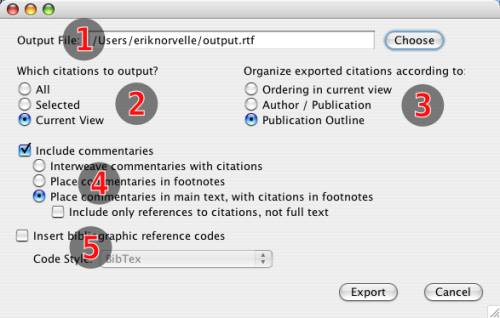
Indicate the name of the file that you want to create; it must have an extension of ".rtf"
Indicate which set of citations you wish to export: all of them, the ones currently selected, or all of those currently visible in the table (i.e. the results of applying the current filter).
Indicate how you want the citations organized. You can let them be organized according to their current order in the database, but normally it is more useful to organize them according to author and publication (with headers for each new author or publication), or else according to the publication outline (if you have the outline configured; see the section on outlines).
If you want to include your own commentaries along with the exported text, you can include how you want them to be included. You can intersperse your commentaries in the body of the exported document, below the text they are commenting, or else you can place them in footnotes attached to each text. A final option is to place the commentaries in the body of the text, and include the corresponding citations in footnotes. If you place the citations in the footnotes, you can choose to save space by simply including a reference to the text, instead of the entire citation.
Finally, along with the texts to be exported, you can export bibliographic references, according to bibliography manager that you use: EndNote, BibTeX, RefWorks, etc. In this way, you can rapidly construct your bibliography with the use of one of these programs.