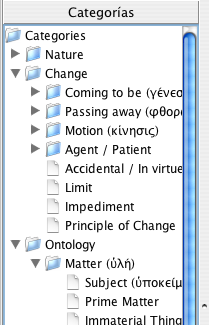
Category Tree
All of the categories that you create in order to organize your citations according to topic or subject, are saved in the "Category Tree". This tree can contain as many categories and subcategories as you would like. It is always available at the left side of the screen, in the second tab of the "Outlook Bar".
Category Tree
This category tree functions like the filesystem tree in Windows Explorer: when you click on a category, the citations associated with the selected category will appear in the table on the right hand side of the screen. Note that the citations associated with the selected category's children or subcategories will also be shown.
You can also add new categories directly to the tree in the "Outlook Bar".