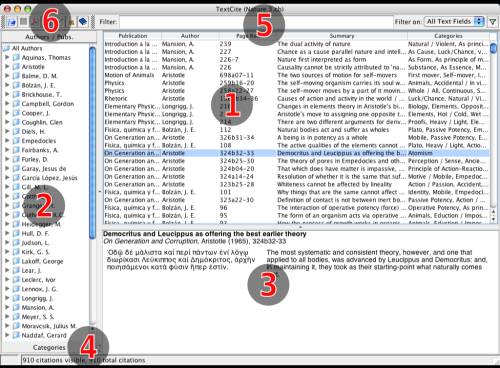
TextCite main screen
The Main Screen
TextCite main screen
The main screen is divided into three over sections, numbered 1-3 in the image above. In addition, there are several toolbars and a status bar.
Section 1 in the image is the list of citations. You can click on the column headers to reorder the citations according to the column chosen. Clicking a second time on the column will reverse the sorting order.
Section 2 contains the list of authors and publications; right below this list is the "Categories" bar, which can be clicked to show the Category Tree, following the MS Outlook style. Clicking on any author, publication or category will filter the citations visible in the table on the right, according to the selection you have just made. Note that this quick filter is in addition to any filter you apply via the Filter Bar.
The window marked as number 3 is the Citation Display. When you click on a citation, this window will display the contents of the "virtual notecard": title, author, summary of the contents, and (if present) the translation and commentaries.
Number 4 is the status bar. You will see here the total number of citations in the current CiteBook, along with the number of citations currently visible (if there is a filter applied).
Number 5 is the Filter Bar. Here you can introduce one or more keywords, and when you click on the Filter button (it has an image of a funnel) the citations visible in the table will be filtered accordingly. There are many filtering options available; for more information, visit the page on the use of the Filter Bar.
The main toolbar contains some of the more commonly used functions of TextCite, such as the creation of new citations, authors and publications, along with export functions.