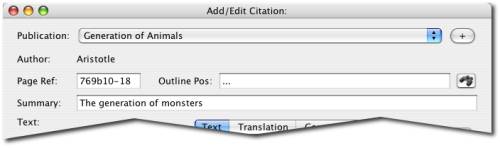
Header information for a citation
The first task upon creating a new citation record is to assign its header information:
The publication (and along with it, its author)
The page reference (or other reference code that enables you to find the citation again)
Its place in the publication outline (if you have created one)
The summary title for the citation
Header information for a citation
The publication can be assigned by selecting the corresponding entry in the list, or else you can add a new publication.
The page reference can be either the page number of the citation, if the publication has page number, or else another reference code that will enable you and others to find the citation again. This should be a standard reference code for the kind of publication in question, since this is the reference code that will appear in your publications, so make sure that it is correct and able to guide your reader to the exact spot in the cited publication.
If you want, you can create an outline for the publication, and assign the citation to a location in this outline. For the moment, the only use for outlines is organizing citations upon exporting to RTF format.
Finally, you must assign a summary title for your citation, which describes in a single line the contents of the citation, so that when you see citations in the table view, you can quickly see which are of interest.