Before entering textual citations in TextCite, make sure your bibliography manager already has a record for the publication you are recording citations for. If a record does not already exist, create one before proceeding. Once you have created it, you will need to copy the unique code that your bibliography manager associates with the new publication; this is your "bibliographic code". See Using Bibliographic Codes for more information on determining the bibliographic code generated by your software.
Create a TextCite entry for the indicated publication
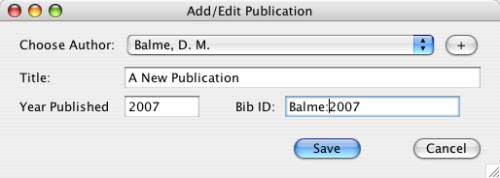
Dialog for creating a new publication
You will note that there is a field for introducing a "Bib ID": this is where you enter the code that your bibliography manager has assigned your new publication.
When you go to insert a citation into a publication, use the function for copying and pasting a citation in order to insert the citation in your word processor. Make sure you have chosen the correct type of references for your bibliographic manager in the TextCite preferences.
When you go to print the document you are working on, first use your bibliography manager to "Create a bibliography"; most bibliography managers have a software utility that works with your word processor to allow you to generate a correctly formatted bibliography and footnotes. You will need to consult your program manual for more information, because every bibliographic manager program has its own method for accomplishing this.